Navigation

How To Flash AOGP 1.0 ROM


This is a guide on how to install the latest AOGP ROM for Samsung Galaxy Grand Duos.

Note :
* You have to upgrade your device to Jellybean 4.2.2 before you flash this ROM. If you are not on 4.2.2 you have to upgrade your device by viewing this GUIDE .

* This ROM is odexed. More stable than deodexed ROM

Installation Instructions :

- You have to install the latest CWM in order flash any Kitkat ROM or else it will show a "Status 7" error while flashing.
- After you install the recovery, Download the AOGP Rom ,Gapps from the "Downloads" section below. Plug it into PC and transfer the above 3 files to internal/external sdcard(place where you can remember) and unplug the device.
- Backup your contacts(export it to sdcard) and app data(Titanium Backup).
- Power off your device. After 2-3 seconds hold Volume Up + Home + Power button together and release them after you see "Samsung Galaxy Grand Duos I9082" logo.
- Now you have booted into CWM.
- Wipe cache partition.
- Wipe data/factory reset.
- Advanced --> Wipe dalvik cache.
- Mounts and Storage --> format /system
- Install zip from sdcard (here sdcard1 is the externel sdcard) --> Choose the rom zip.
- After that install the gapps the same way you installed the rom zip.
- Reboot your phone.

Review :


Downloads :

AOGP ROM - XDA Thread ---rom zip
Gapps ---gapps

Do share this and subscribe me on Youtube to view more previews and guides on Samsung Galaxy Grand Duos.

 Youtube page
   Google+ page

[New Video Series] Whats on my Grand

Watch the new series started by GGC live on YouTube, were I will show all the things that I am using on my Grand every week !

  This new series has new design and look compared to other Quick Peek videos. Watch #1 of  Whats on my Grand now !

#1 - Whats on my Grand


Youtube page
    Google+ page

Install Cosmic CM v4.4 - Best and Stable For Daily Use


This is a guide on how to install the latest Cosmic CM ROM for Samsung Galaxy Grand Duos.

Note :
* You have to upgrade your device to jellybean 4.2.2 before you flash this ROM. If you are not on 4.2.2 you have to upgrade your device by viewing this GUIDE .

* This ROM is odexed. More stable than deodexed ROM

Installation Instructions :

- You have to install the latest CWM in order flash any Kitkat ROM or else it will show a "Status 7" error while flashing.
- After you install the recovery, Download the Cosmic CM Rom ,Gapps from the "Downloads" section below. Plug it into PC and transfer the above 3 files to internal/external sdcard(place where you can remember) and unplug the device.
- Backup your contacts(export it to sdcard) and app data(Titanium Backup).
- Power off your device. After 2-3 seconds hold Volume Up + Home + Power button together and release them after you see "Samsung Galaxy Grand Duos I9082" logo.
- Now you have booted into CWM.
- Wipe cache partition.
- Wipe data/factory reset.
- Advanced --> Wipe dalvik cache.
- Mounts and Storage --> format /system
- Install zip from sdcard (here sdcard1 is the externel sdcard) --> Choose the rom zip.
- After that install the gapps the same way you installed the rom zip.
- Reboot your phone.

Downloads :

Cosmic CM ROM ---rom zip
Gapps ---gapps

Do share this and subscribe me on Youtube to view more previews and guides on Samsung Galaxy Grand Duos.

 Youtube page
   Google+ page

C-ROM -Kitkat v6.6


This is a guide on how to install the latest C-ROM for Samsung Galaxy Grand Duos.

Note :
You have to upgrade your device to jellybean 4.2.2 before you flash this ROM. If you are not on 4.2.2 you have to upgrade your device by viewing this GUIDE .

Installation Instructions :

- You have to install the latest CWM in order flash any Kitkat ROM or else it will show a "Status 7" error while flashing.
- After you install the recovery, Download the C-Rom ,Gapps from the "Downloads" section below. Plug it into PC and transfer the above 3 files to internal/external sdcard(place where you can remember) and unplug the device.
- Backup your contacts(export it to sdcard) and app data(Titanium Backup).
- Power off your device. After 2-3 seconds hold Volume Up + Home + Power button together and release them after you see "Samsung Galaxy Grand Duos I9082" logo.
- Now you have booted into CWM.
- Wipe cache partition.
- Wipe data/factory reset.
- Advanced --> Wipe dalvik cache.
- Mounts and Storage --> format /system
- Install zip from sdcard (here sdcard1 is the externel sdcard) --> Choose the rom zip.
- After that install the gapps the same way you installed the rom zip.
- Reboot your phone.

Downloads :

C-ROM ---rom zip
Gapps ---gapps

Do share this and subscribe me on Youtube to view more previews and guides on Samsung Galaxy Grand Duos.

 Youtube page
   Google+ page

CM 11 now supports Dual-Sim


Everyone was avoiding CM11 ROM because dual-sim was not present. Now that its come, nobody uses Samsung based ROM because it is that awesome. Soon dual-sim will be available for all roms but it is on the developer to include this feature. Below is the procedure to install CM11 ROM with dual-sim :

Installation Instructions:

- You have to install the latest CWM in order flash any Kitkat ROM or else it will show a "Status 7" error while flashing.
- After you install the recovery, Download the CM11 Rom ,Gapps and SuperSu from the "Downloads" section below. Plug it into PC and transfer the above 3 files to internal/external sdcard(place where you can remember) and unplug the device.
- Backup your contacts(export it to sdcard) and app data(Titanium Backup).
- Power off your device. After 2-3 seconds hold Volume Up + Home + Power button together and release them after you see "Samsung Galaxy Grand Duos I9082" logo.
- Now you have booted into CWM.
- Wipe cache partition.
- Wipe data/factory reset.
- Advanced --> Wipe dalvik cache.
- Mounts and Storage --> format /system
- Install zip from sdcard (here sdcard1 is the externel sdcard) --> Choose the rom zip.
- After that install the gapps the same way you installed the rom zip.
- Reboot your phone.

How to enable dual-sim :

- Go to terminal emulater (present in your app drawer)
- Type
su
setprop persist.radio.multisim.config dsds
- Reboot
- SIM Settings can then be found in Settings -> Multi Sim Settings.


CM11 ROM ---rom zip
Gapps ---gapps

Do share this and subscribe me on Youtube to view more previews and guides on Samsung Galaxy Grand Duos.

 Youtube page
   Google+ page

How to install ProBAM ROM on your Samsung Galaxy Grand Duos


This is a guide on how to install the latest ProBAM ROM for Samsung Galaxy Grand Duos.

Note :
You have to upgrade your device to jellybean 4.2.2 before you flash this ROM. If you are not on 4.2.2 you have to upgrade your device by viewing this GUIDE .

Installation Instructions :

- You have to install the latest CWM in order flash any Kitkat ROM or else it will show a "Status 7" error while flashing.
- After you install the recovery, Download the ProBAM Rom ,Gapps and SuperSu from the "Downloads" section below. Plug it into PC and transfer the above 3 files to internal/external sdcard(place where you can remember) and unplug the device.
- Backup your contacts(export it to sdcard) and app data(Titanium Backup).
- Power off your device. After 2-3 seconds hold Volume Up + Home + Power button together and release them after you see "Samsung Galaxy Grand Duos I9082" logo.
- Now you have booted into CWM.
- Wipe cache partition.
- Wipe data/factory reset.
- Advanced --> Wipe dalvik cache.
- Mounts and Storage --> format /system
- Install zip from sdcard (here sdcard1 is the externel sdcard) --> Choose the rom zip.
- After that install the gapps the same way you installed the rom zip.
- Reboot your phone.

Downloads :

ProBAM ROM ---rom zip
Gapps ---gapps

Do share this and subscribe me on Youtube to view more previews and guides on Samsung Galaxy Grand Duos.

 Youtube page
   Google+ page

How to install Omni Rom 4.4.2 Kitkat for Samsung Galaxy Grand Duos


This is a guide on how to install the latest Omni ROM for Samsung Galaxy Grand Duos.

Note :
You have to upgrade your device to jellybean 4.2.2 before you flash this ROM. If you are not on 4.2.2 you have to upgrade your device by viewing this GUIDE .

Installation Instructions :

- You have to install the latest CWM in order flash any Kitkat ROM or else it will show a "Status 7" error while flashing.
- After you install the recovery, Download the Omni Rom ,Gapps and SuperSu from the "Downloads" section below. Plug it into PC and transfer the above 3 files to internal/external sdcard(place where you can remember) and unplug the device.
- Backup your contacts(export it to sdcard) and app data(Titanium Backup).
- Power off your device. After 2-3 seconds hold Volume Up + Home + Power button together and release them after you see "Samsung Galaxy Grand Duos I9082" logo.
- Now you have booted into CWM.
- Wipe cache partition.
- Wipe data/factory reset.
- Advanced --> Wipe dalvik cache.
- Mounts and Storage --> format /system
- Install zip from sdcard (here sdcard1 is the externel sdcard) --> Choose the rom zip.
- After that install the gapps the same way you installed the rom zip.
- Install the SuperSu
- Reboot your phone.

Video Preview :


Downloads :

Omni ROM ---rom zip
Gapps ---gapps
SuperSu

Do share this and subscribe me on Youtube to view more previews and guides on Samsung Galaxy Grand Duos.

 Youtube page
   Google+ page
Update Your Galaxy Grand To Latest 4.2.2 Firmware


Downloads :


How to flash :

- You need odin 3.07 get it here --> Link
- Extract the rar file and you will get a .tar .md5 file.
- Before you continue to further steps backup necessary data from your device because it cannot be retained. 
-Now Power Off your device. Press and Hold Volume down + home + power button untill you see the "WARNING!" screen. Press Volume up to confirm.
-Plug your device to PC/Laptop. If it prompts "Device Drivers being installed" let it install the necessary drivers.
- Now right click Odin 3.07 that you have downloaded --Select "Run as administrator" --Click Yes- Select PDA tab and browse to where you have extracted the .tar.md5 file (See the image below)
- Do Not Select any other option.-And START !

When the ODin says RESET remove usb !

Done


Galaxy Grand 2 support from GGC


The galaxy grand center will officially support "Galaxy Grand 2" from rooting of the phone to a official custom ROM by GGC.

Overview:
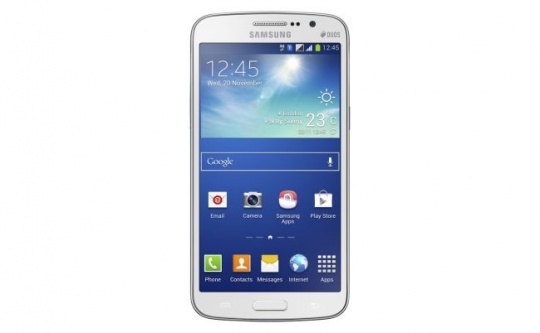
Samsung today launched the successor to the successful Samsung Galaxy Grand in India, the Samsung Galaxy Grand 2. Launched earlier this year, Samsung Galaxy Grand set certain benchmarks and brought new features like multi-window to a budget smartphone.
The Grand 2 smartphone is really a phablet. Samsung clearly loves big screens and Samsung Galaxy Grand is all about being large-hearted. The phablet comes with a generous 5.25-inch TFT display. The screen resolution is 720 x 1280 pixels. At 280 ppi, there's a lot Samsung leaves to desire here. The bigger the screen and smaller the resolution, the worse is the reading experience. Bigger is clearly not always the better and Samsung Galaxy Grand 2 proves just that.

While the screen more than disappoints, the news that Samsung Galaxy Grand 2 comes with the latest Android Jelly Bean 4.3 is sure to make you smile. Yes, we do know that KitKat is already here but there's still time before smartphone makers adapt to the all new Android platform. Till CES 2014, Jelly Bean 4.3 is all you get and honestly, there's no real reason to complain.

So far it has been a tie for the phone. But the one thing that will tip scales in favour of or against the device is the hardware. Samsung Galaxy Grand 2 runs a 1.2 GHz quad-core processor under the hood.  Discounting the octa-core craze, quad core is the best out there. However, while phonemakers have often dangled the quad-core carrot before, the low RAM has proved to be the catch. With a 1.5 GHz RAM, Samsung has ensured that Samsung Galaxy Grand 2 is as smooth as butter. The smartphone with the big screen is clearly for multi-tasking and some good gaming. With the processor and an adequate RAM, Samsung Galaxy Grand 2 is quite a capable phablet.

CyanogenMod 11.0 made stable


As I have said in my before post while guiding you all to install cm11.0 that the bugs are being fixed. Well, I can say in the latest build everything seem to be fine with an awesome battery backup of 1 day(moderate use).

I recommend to use this rom as daily driver as it is the smoothest rom ever built for our device.
In the latest build every bug leaving only dual sim issue which is one heck of a problem to fix. Though developers are working to fix it and will hear a good news from them soon.

Download :
Latest build :- here
Detailed guide :- here

Do comment if any queries about the ROM and the process.
You can share this post to your friends to spread this awesome news !

Xposed Framework. Explained !


Xposed framework is a customizer of system apps in android phones. Instead of customizing the app itself it remotely controls the lines to be  changed inside the app through a xml file. A brilliant way to change the way our phone looks.

Today I will walkthrough on Installation of xposed framework and how to make your own customization. This app strictly needs root as it penetrates into system to make changes.

Installation: 
-You need to download xposed app here
-Install the app normally.
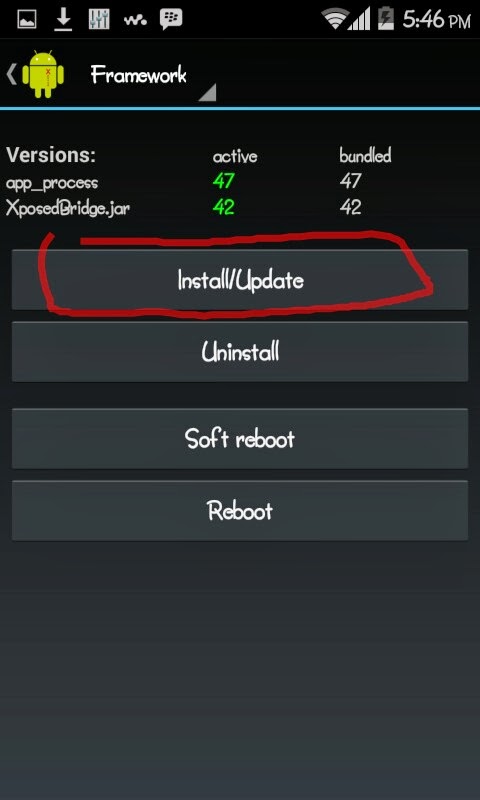
-Follow the images below.

- Grant superuser permission.
- click on reboot.
- After reboot you have to go to Download.(See 1st image above)
-Download the desired module.
- Select above on download(see image below[blue mark] ) . Select Modules(red mark).
-Select the modules.(See the 2nd image below)

- Reboot your phone.
- Now your installed modules will be visible in your launcher.


The above modules are my favourite ones. Also if you want to know more about modules you can go to Download -->your module-->original thread.

Thanks alot ! More Explained posts coming !


Install CM 11.0 on your SGG

Hello guys, xda recognized developer pawitp has compiled cm11.0 i.e: android 4.4 kitkat for our device which is very much stable for daily use.

Original thread: here

Instructions:

- You must be on 4.2.2 rom/firmware before installing this rom.
This is important or else the rom will not boot.
- Go here to download the rom and here to download the gapps.
- Install recovery via odin. Recovery link - here
You must install the above recovery or else you will get a status 7 error.
- Now after installing recovery via odin go to cwm by 3 button combo.(vol up+home+power)
- Wipe cache partition.
- Wipe data/factory reset.
- Advanced --> Wipe dalvik cache.
- Mounts and Storage --> format /system
- Install zip from sdcard -- Choose the rom zip.
- After that install the above linked gapps.
- Reboot your phone.

Now you have succefully installed cm11.0 and running android 4.4 kitkat.

Do leave comments if any issues.

Top 5 free Casual Games 2013

Here I list the top 5 free casual games.I will explain each game in detail.

If you want a video review of these games please comment below!

So lets start,

1. Giant bolder of death - Play Store Link

In this game a giant bolder falls from top of the mountain. Your goal is to cause as much destruction as possible. And also complete the missions.

2.Subway Surfers(Orleans) - Play Store Link

With Halloween coming closer the subway surfers trip has changed to the New Orleans. The city of horror has some new surprises with new costumes and many more modifications.

3.Samurai vs Zombies Defense 2 - Play Store Link

High-end, immersive tablet gameplay!
The Samurai is back... and he’s brought friends! Play as the heroic Samurai, the deadly Kunoichi Assassin, and the stalwart Armored Ronin to defend your village against even nastier hordes of brutal zombies and demons! Recruit allies, build defenses, and recover sacred Artifacts to stop them!

4.Jetpack Joyride - Play Store Link

A new update has brought some really cool featured game to us.Many new modifications to jetpack will blow your mind.

5.Despicable Me - Play Store Link

Halloween is just blowing away over playstore with some great game like this jumping to some new modifications and this time minions are all over the city.

Best HD Wallpapers for SGG


Collection of wallpapers that suits our phone the best. Enjoy the HIGH DEF


NATURE :

here

TEXTS :

here


MINIMAL HEROS :
 
here (Go to the link and press CTRL + S to download all(zip))

MORE SOON 

AOKP - Android Open Kang Project


Xda developer/senior member k2wl a.k.a Kaustubh built a AOKP rom for Grand which is bug free !

Buttery UI transitions and smooth gaming performance.
Original thread - here

Features -

* 4.2.2 android version
* Three UI modes
- Tablet
- Phablet  and
- Stock
* Adjustable Navbar/Sysbar
* Changable toggle icons and battery icons
** And many more

Installation :

-Copy your rom.zip to extsdcard
-Reboot to recovery. (Vol up + home + power) buttons
-Do a data/factory reset
-wipe cache partition
-Advanced > wipe dalvik cache
-(back) mounts and storage > format system CAUTION ! (format extsdcard is just below it)
-(back) Choose zip from sdcard
-Locate to where you have placed the ROM
-select it and yes to confirm flash
-Reboot and enjoy !

Direct download :

Link or Link

MIUI for Galaxy Grand Duos


XDA Senior member "adityaf" a.k.a Aditya Fatteputkar has ported MIUI rom for our galaxy grand duos.Do visit and click a Thanks Button !

Original Thread

Instruction to flash :

*  Prerequisites -

-Rooted
-CWM installed.  IF NOT - Click here

*How to flash -

-Copy your rom.zip to extsdcard
-Reboot to recovery. (Vol up + home + power) buttons
-Do a data/factory reset
-wipe cache partition
-Advanced > wipe dalvik cache
-(back) mounts and storage > format system CAUTION ! (format extsdcard is just below it)
-(back) Choose zip from sdcard
-Locate to where you have placed the ROM
-select it and yes to confirm flash
-Reboot and enjoy !

Screenshots :


Download :
here


Cyanogenmod 10.1 for grand

CyanogenMod is a free, community built, aftermarket firmware distribution of Android 4.2 (Jelly Bean), which is designed to increase performance and reliability over stock Android for your device.

Code:
#include 
/*
 * Your warranty is now void.
 *
 * I am not responsible for bricked devices, dead SD cards,
 * thermonuclear war, or you getting fired because the alarm app failed. Please
 * do some research if you have any concerns about features included in this ROM
 * before flashing it! YOU are choosing to make these modifications, and if
 * you point the finger at me for messing up your device, I will laugh at you.
 */
CyanogenMod is based on the Android Open Source Project with extra contributions from many people within the Android community. It can be used without any need to have any Google application installed. Linked below is a package that has come from another Android project that restore the Google parts. CyanogenMod does still include various hardware-specific code, which is also slowly being open-sourced anyway.

What works?
  • Wi-Fi (including Wifi Direct and Tethering)
  • Bluetooth
  • RIL (Calls, SMS, Mobile Data)
  • Sensors (Accelerometer, Compass, Light, Proximity, etc.)
  • Camera (photo & video)
  • Video playback
  • Audio (playback & recording)
  • GPS
  • Everything else not listed under "known issues"

Known Issues
  • Only the primary SIM slot works
  • Landscape does not display properly (workaround: Disable HW overlays in Developer Options)
  • FM Radio does not work
  • Strange behavior when SIM PIN lock is used
  • Low call volume
  • Cannot hear first caller when second caller calls (call waiting) (unconfirmed)
  • Does not work on 4.2 stock ROM's bootloader, please revert to 4.1 before flashing

Installation
  1. Install ClockworkMod recovery (if you haven't done so already). See chotu222's guide for detailed instruction.
  2. Make a backup!
  3. Install the ROM using ClockworkMod Recovery
  4. Optionally install the Google Apps Addon
  5. Wipe data if coming from stock


Download

LINK

Source

LINK

[Leaked][Sammobile]Android 4.2.2 Firmware for SGG

Hello guys, I am back with a good news !

SamMobile received by one of our insiders an official test ROM based on Android 4.2.2 for the Galaxy Grand DUOS. Galaxy S4 was the first Samsung device to run Android 4.2.2 out of the box but Samsung’s been busy updating older devices to Android 4.2.2. We don’t know the exact date or the devices that will get Android 4.2.2 but we expect it to be from this quarter for Galaxy S III, Galaxy Grand DUOS, Note II and a couple of tablets.
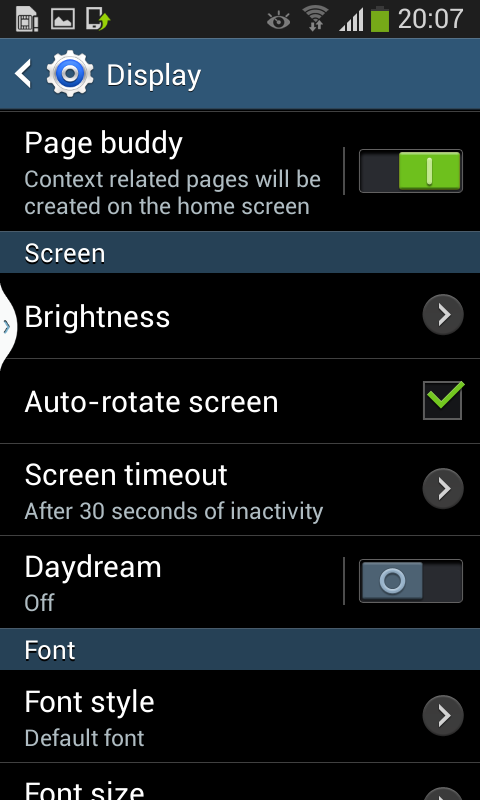
As said in the beginning, this update is for the Galaxy Grand DUOS GT-I9082 that features a 5” TFT LCD  WVGA (480×800) resolution display, a 8 megapixel camera and a 1.2GHz dual-core processor. The device came on Android 4.1.2 but with this Android 4.2.2 update that came from last month, you can expect some new features like transparent notification bar, Smart Stay, Light effect by unlocking, Page Buddy and Day dream. The device itself feels pretty fast compared with Android 4.1.2 and the battery life seems to be improved. Samsung didn’t update the camera with new features.


A couple of screenshots and a video of the Galaxy Grand DUOS based on Android 4.2.2. Our advice is to read the instructions before flashing!

:


Video by Sammobile :

LINK

Downloiads :

Link

Or Download in parts :

Part 1

Part 2

Part 3

Part 4


How to flash :

-You need odin 3.07 get it here --> Link
-CODE_i9082_***.tar.md5 to PDA

-MODEM_i9082_****.tar.md5 to PHONE

-CSC to CSC

-baffin.pit file to PIT

-Boot to BOOTLOADER

-And START !

When the ODin says RESET remove usb !

And Done !

I will make a quick review on this firmware soon !

Xperia V Walkman for SGG

SONY XPERIA V WALKMAN : //I think it should work on all samsung based jellybean ROM
INSTALLATION: (follow the steps as it is) YOU NEED ATLEAST 70MB on your ROM
-wipe cache partition
-wipe dalvik cache
-flash this zip ---> here
-wipe dalvik cache

SCREENS :


CREDITS :
Rizal Lovins <--Master developer of Xperia v walkman

ORIGINAL THREAD : here

NOTE : Clearaudio+ is still WIP so dont press that option in the walkman !
Will update a flashable zip for Xperia home for walkman widget to work

Note II Pop-up browser port for SGG


Hello guys,i have just ported pop-up browser which is a note ll feature which was missing in our device !!

However,i noticed a thing that this app is firmware varient !
I ported it in XXAMAC and after i upgraded to XXAMC5(latest Indian) i saw that the app force close.so i noticed that some images/smalis are missing in twframework
so i could port for only these firmwares :(

If you want for any other firmware(9082L users too) can give me the link of their twframework

DOWNLOADS :

  • XXAMAC => here
  • XXAMC5 => here


    Do post comment if you have any difficulty !